 enCAST.pro
Best Film Editing Software for Beginners
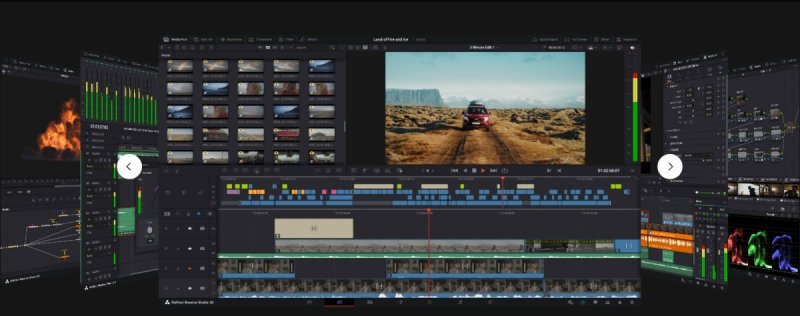
For beginners, I recommend DaVinci Resolve (free version), iMovie (Mac), and Clipchamp (Windows).
These programs balance power with simplicity. You can start editing today and still use them professionally later.
Why These Three Work Best #
DaVinci Resolve offers professional tools without any cost. iMovie comes free with every Mac computer. Clipchamp ships with Windows 11 and runs in your browser.
Each software serves different needs. Let me help you choose the right one for your situation.
DaVinci Resolve: Professional and Free #
Blackmagic Design offers DaVinci Resolve completely free, with most professional features included. Major films including "Dune" (2021) and "The Batman" (2022) used this software for color grading. The free version handles 4K editing, color correction, and audio mixing.
The interface has four main sections: editing, color, audio, and effects. Start with just the editing section. Learn the others when you need them. Most beginners spend three months just in the editing workspace.
Learning resources are excellent. YouTube has over 15,000 DaVinci Resolve tutorials. Blackmagic provides official training videos and a comprehensive manual. Many professional editors share their knowledge freely online.
Your computer needs 8GB RAM minimum, though 16GB works better. The software runs on Windows, Mac, and Linux.
iMovie: Apple's Simple Solution #
Mac users already have iMovie installed free. Apple designed it for complete beginners. You can create your first video in 30 minutes.
The interface stays clean and logical. Drag clips to the timeline, trim them, add transitions. No complex menus or confusing options. Every button does exactly what you expect.
iMovie handles 4K footage smoothly on Macs from 2016 onward. Your projects sync between iPhone, iPad, and Mac automatically. When you're ready for more features, projects transfer directly to Final Cut Pro.
The main limitation is simplicity itself. You can't do advanced color grading or complex effects. But that helps you focus on storytelling instead of technical details.
Clipchamp: Microsoft's Browser Solution #
Windows 11 includes Clipchamp free, or use it directly in your browser. Microsoft bought this company in 2021 for $165 million and integrated it into Windows. No download needed if you use the web version.
The software includes templates for common video types. You get access to stock footage, music, and graphics - over 1 million free assets. The timeline uses standard drag-and-drop editing that anyone can understand.
Cloud saving means you can edit from any computer. Projects auto-save every few seconds. Export settings are pre-configured for YouTube, Instagram, and TikTok.
Speed depends on your internet connection since it's browser-based. Offline editing requires the desktop app.
How to Choose Your Software #
Consider these factors:
Your Computer: Mac owners should start with iMovie. Windows users can begin with Clipchamp immediately. Any computer can run DaVinci Resolve if it meets requirements.
Your Time: DaVinci Resolve needs 20-40 hours to learn basics. iMovie takes 2-3 hours. Clipchamp requires about 5-10 hours for comfort.
Mistakes to Avoid #
Don't pay for software yet. Adobe Premiere Pro costs $23 monthly but overwhelms beginners. Master free software first. You can always upgrade later when you understand what features you actually need.
Don't download pirated versions. A 2022 Digital Citizens Alliance study found malware in 52% of cracked video software. Legal free options exist - use them safely.
Check your computer specifications first. Video editing needs processing power. Ensure you have 8GB RAM minimum and 50GB free storage. Slow computers make learning frustrating.
Computer Setup Tips #
Your RAM matters most - 8GB minimum, 16GB ideal. Graphics cards help significantly. Even older cards like NVIDIA GTX 1050 improve performance. Solid-state drives (SSDs) speed up everything compared to traditional hard drives.
A second monitor doubles your workspace. Even an inexpensive monitor helps. A proper mouse works better than trackpads for precise editing. External hard drives store large video files efficiently.
Growing Your Skills #
Join communities for your chosen software. Reddit's r/VideoEditing has over 500,000 helpful members. Facebook groups offer software-specific advice. Discord servers provide real-time help.
Follow educators on YouTube. Casey Faris teaches DaVinci Resolve brilliantly. Justin Brown covers multiple programs. Premiere Gal explains concepts clearly. Watch one tutorial weekly.
After three months, consider structured courses. Udemy courses cost $10-30 during frequent sales. LinkedIn Learning offers certificates. Many libraries provide free access to training platforms.
Software Comparison Summary #
DaVinci Resolve
- Free forever
- Professional features
- Steeper learning curve
- Needs decent computer
iMovie
- Mac only
- Easiest to learn
- Limited advanced features
- Perfect for beginners
Clipchamp
- Windows/browser
- Moderate complexity
- Cloud storage included
- Good for social media
CapCut
- Mobile-friendly
- Trending effects
- Social media focused
- Quick exports
Start Editing Today #
Choose one software and commit to learning it for 30 days. Every professional editor started as a beginner. The perfect software doesn't exist - only the right one for you right now.
Download your chosen program today. Import any video. Make one cut. Export one file. These simple steps begin your editing journey.
Remember that editing is about storytelling, not software. The tools simply help you tell stories better. Focus on making something meaningful, even if it's imperfect. You'll improve with every project.


Questions about this page?
If something here is unclear or out of date, let us know through our contact page.