 enCAST.pro
How to Self-Tape an Audition
A self-tape is a video of you performing a scene. You film it yourself and send it to the casting director.
Self-tapes let you apply for work anywhere, with no travel. A good one is easy to make. But a bad one is easy to make too.
If the casting gives its own instructions, follow those first. If it does not, follow the steps below.
1. Learn the lines #
Do not read from the page. Learn the scene before you film, so you can look up and act.
2. Find a reader #
A reader is the person who says the other character's lines. They are not in the picture.
- Best: a real person in the room. They do not need to be an actor, but that always helps.
- Next best: a friend on a video call. Put the call screen right next to the phone you film with.
- Last choice: a recording of the other lines, or an app that reads them. It does not sound good. Use this only if nobody can help you.
The reader should stand right next to the phone and read in a quiet, neutral way. Your voice must be the loudest thing on the tape. It does not matter if the reader is hard to hear.
3. Turn your phone sideways #
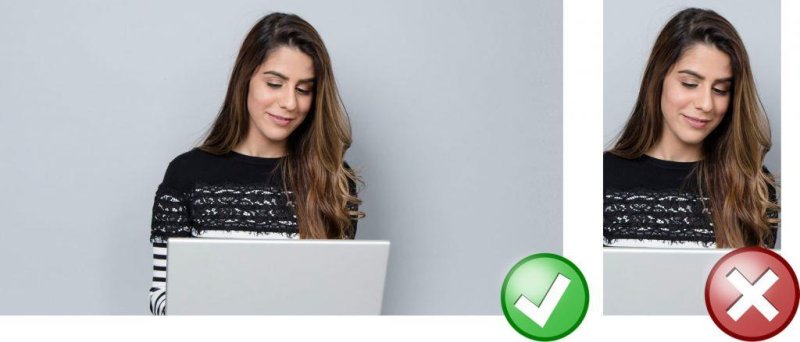
A phone or tablet is fine. You do not need a special camera.
Always film in landscape (sideways). Never film in portrait (upright). The picture shows why.
4. Keep the phone still #
Nobody should hold the phone. Even a steady hand moves.
- Best: a small phone tripod. They are cheap and you will use it for every self-tape.
- No tripod? Stand the phone on a shelf, or on a pile of books on a table. Lean it against something heavy so it cannot slip.
- Height: the camera should be level with your eyes. It should not look up at you or down at you.
- Check the picture is straight and sharp before you start.
5. Keep the background simple #

A plain wall is best. The casting director should look at you, not at your room. In the picture, the woman is much easier to see than the man.
One or two props are fine if they help the scene. For a kitchen scene, a cup is enough. Do not build a set.
6. Be seen and be heard #
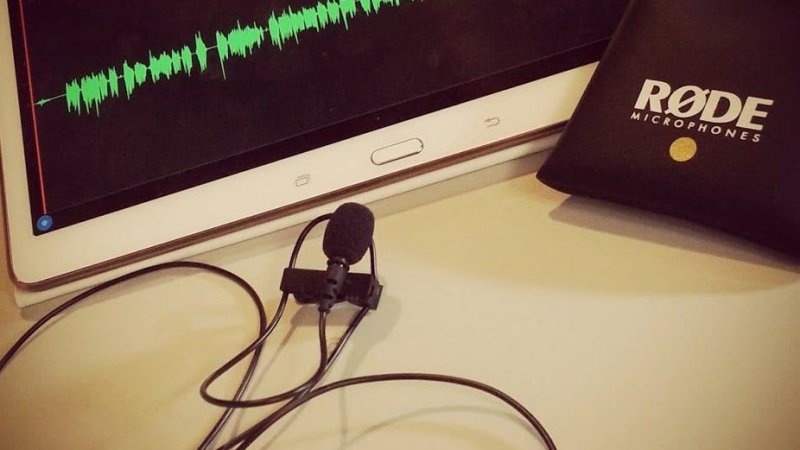
Light. Your face must be easy to see. Face a window in the daytime. Do not stand with the window behind you. A ring light or LED lamp helps, but daylight is enough to start.
Sound. The microphone in your phone is good enough if you help it:
- Stay close to the phone. The nearer you are, the clearer your voice.
- Find a quiet room. Close the windows and doors. Turn off the TV, the fan and the washing machine.
- Avoid empty rooms. A room with a sofa, curtains or a bed sounds better than a bare room with an echo.
- Do a test. Record ten seconds, then listen with headphones. If you can hear every word easily, you are ready.
A clip-on microphone is nice to have later. A good one costs less than €100. You do not need one to start.
7. Stay in the picture and look beside the camera #

- Flight mode: switch the phone to flight mode before you record. A call or a message will ruin the take.
- Framing: show your head and upper chest.
- Where to look: do not look into the camera. Look at your reader. If you have no reader, look at a mark on the wall just beside the phone.
- Stay in the picture. Keep the camera on you for the whole scene, including when the other character speaks. The casting director wants to see you listen and react.
- Keep it small. For action scenes, move as little as you can.
- Film only the scene you were given. Do not introduce yourself on camera unless the casting asks you to.
- Hold the end. When the scene is over, stay still for two seconds before you stop recording.
- Do it more than once. Film the scene a few times, so you can choose the best one.
8. Edit and name your tape #
After you have finished recording the scene several times...
- Choose your best take. Send one take only, unless you are asked for more.
- Cut off the start and the end, where you walk to and from the phone.
- Add a title card at the start and the same card at the end. It should show your name, the role and your email address.
- Add nothing else. No other shots, no music, no effects.
- Watch the whole tape once before you send it.
- Give the file a clear name with your name and the role, like this: joe_actor_self-tape_colonel.mp4
9. Send your tape #

There are two ways. Use the one the casting asks for.
Send a link. Upload the video to YouTube or Vimeo and send the link. Never make the video public. The production does not want it seen by everyone. On YouTube, choose Unlisted. Do not choose Private, because the casting director cannot open it.
Send the file. Use a transfer service such as WeTransfer. Do not attach the video to an email, because it is too big.
If the casting gives a maximum file size, keep under it.
10. Send it early #
Do not wait for the deadline. If the deadline is 6pm on Friday, send it on Thursday. Then you have time to fix a problem.
Good luck!


Questions about this page?
If something here is unclear or out of date, let us know through our contact page.