 enCAST.pro
100% Beginners - How to Download DaVinci Resolve Free and Actually Learn It
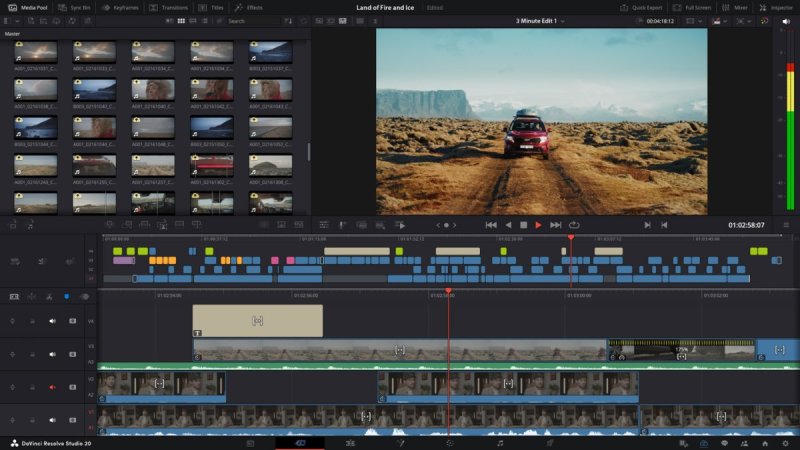 So you want to learn DaVinci Resolve? Good choice. This is the same software used to edit major Hollywood films like Dune and Black Widow. And it's completely free.
Not a trial. Actually free. (There is a paid version, but that just adds a few bells and whistles to the free version; you can easily create incredible edits on the free version forever.)
Getting the Software #
Head to the Blackmagic Design website and find the download section . You'll see two options: DaVinci Resolve (free) and DaVinci Resolve Studio (paid, $295).
Download the free one. They'll ask for your name, email, and country. No credit card required. The installer is around 2-3 GB, so the download might take a while depending on your internet speed.
The free version handles 4K video at 60 frames per second. That's more than enough for most people. You'll only need the Studio version if you're working on professional productions that require specific advanced features.
Quick note on hardware: You'll want at least 16GB of RAM and a dedicated graphics card for smooth performance. But don't let that stop you from trying it out.
Where to Start Learning #
Open DaVinci Resolve for the first time and you'll see multiple pages, lots of buttons, and might feel overwhelmed. That's normal.
The best place to start is with Blackmagic Design's own free training materials . They created the software, so they know how to teach it. Their training page offers a free PDF book called "The Beginner's Guide to DaVinci Resolve 19" that walks you through everything step by step.
This guide uses a project-based approach. You learn by actually making things, not just reading theory. It covers editing, color grading, working in Fairlight (the sound editor part of Resovle), and visual effects using Fusion.
Blackmagic also provides free video tutorials organized by topic. These are professionally produced and assume you're starting from zero. Begin with the basic editing videos before moving to more advanced topics.
YouTube Resources #
YouTube has thousands of DaVinci Resolve tutorials. Some are excellent, some are confusing. Here are a few reliable creators:
Darren Mostyn creates clear, well-structured tutorials for beginners to advanced. His videos explain concepts without rushing through steps. He's especially brilliant on color correction.
Mr. Alex Tech offers straightforward explanations and covers practical editing scenarios you'll actually encounter.
The advantage of YouTube is flexibility. You can pause, rewind, and watch sections multiple times until they make sense. Search for specific questions when you get stuck:
- How can I remove an object from the background?
- How can I speed up a clip?
- How can I export the video to YouTube?
- ...and so on!
Paid Courses Worth Considering #
If you prefer structured learning with a clear path, Ripple Training offers highly regarded courses specifically for DaVinci Resolve. Their "Introduction to DaVinci Resolve" takes you from complete beginner to confident editor.
Students consistently praise Ripple Training for being thorough without wasting time. You work on real projects that build your skills progressively.
Udemy has several DaVinci Resolve courses . Look for ones with recent updates (2024-2025) since the software changes regularly. "DaVinci Resolve Mastery: The Ultimate Video Editing Bootcamp" by Louay gets good reviews. It's 11 hours long and covers editing, color correction, and effects.
These courses often go on sale for $15-20, which is reasonable if you want a complete learning system.
How to Actually Learn #
Most people fail to learn video editing software because they try to learn everything at once. Instead, focus on one skill at a time, and take your time!
Week one: Learn to import footage and make basic cuts. Nothing fancy. Just getting clips onto the timeline and trimming them, mixing them, swapping them.
Week two or three: Follow a complete beginner tutorial from start to finish. Use the practice files if they're provided. Make something simple.
After that, edit something for yourself. Birthday footage, vacation clips, anything. The difference between watching tutorials and actually editing is huge. You'll encounter problems that force you to learn solutions.
Once you're comfortable with basic editing, explore color grading. This is where DaVinci Resolve really stands out. The color tools are professional-grade and surprisingly intuitive once you understand the basics.
Audio editing in Fairlight and visual effects in Fusion come later. One thing at a time.
Getting Help When You're Stuck #
Join a DaVinci Resolve community on Facebook or the official Blackmagic forum . When you hit a problem, someone has probably solved it before. Real people can answer your specific questions faster than searching through tutorials.
Expect your first projects to look rough. That's normal. Professional editors made countless bad edits before developing their skills. The learning curve exists, but it's manageable if you're patient with yourself.
Why This Matters #
DaVinci Resolve is professional software that happens to be free. Unlike Adobe Premiere Pro with its $55 monthly subscription, you download DaVinci Resolve once and it's yours. No recurring fees.
The free training from Blackmagic Design is genuinely good. Supplement it with YouTube tutorials that match your learning style and answer your specific questions. Then practice with real projects.
You don't need expensive courses or top-tier hardware to start. You need the free software, free learning resources, and consistent practice.
Download it from the official site . Watch some training videos . Import footage and start cutting. That's how you begin.


Comments
No comments yet. Be the first to share your thoughts.
View full discussion on the forum
Log in to join the discussion.